

How to Do Nepali Words Typing Easily in 2026 Online

How to Do Nepali Words Typing Easily in 2026 Online
If you are searching for the easiest way to start nepali words typing in 2026, you are in the right place. The good news is that you no longer need to install complicated keyboard software, memorize difficult layouts on day one, or struggle with old font issues. With modern browser tools, you can type Nepali words online in minutes from your phone or laptop.
In this guide, you will learn practical, beginner-friendly methods to do nepali words typing faster and more accurately. You will also get direct links to tools on TypeNepal that help with typing, conversion, documents, and practice.
Why Nepali Words Typing Is Much Easier in 2026
Typing Nepali used to be hard because people had to manage different encodings, old legacy fonts, and non-standard keyboard setups. In 2026, things are cleaner:
- Unicode is the default for websites, mobile apps, search, and documents.
- Romanized typing lets you type Nepali using English letters (for example,
namaste->नमस्ते). - Web-based tools work instantly without setup.
- Cross-device compatibility means your typed content works on Windows, Mac, Android, and iOS.
- Built-in suggestions and keyboard maps reduce mistakes and speed up learning.
If your goal is to write messages, create documents, prepare formal letters, or practice speed, the online workflow is now straightforward.
The Best Workflow for Nepali Words Typing (Step by Step)
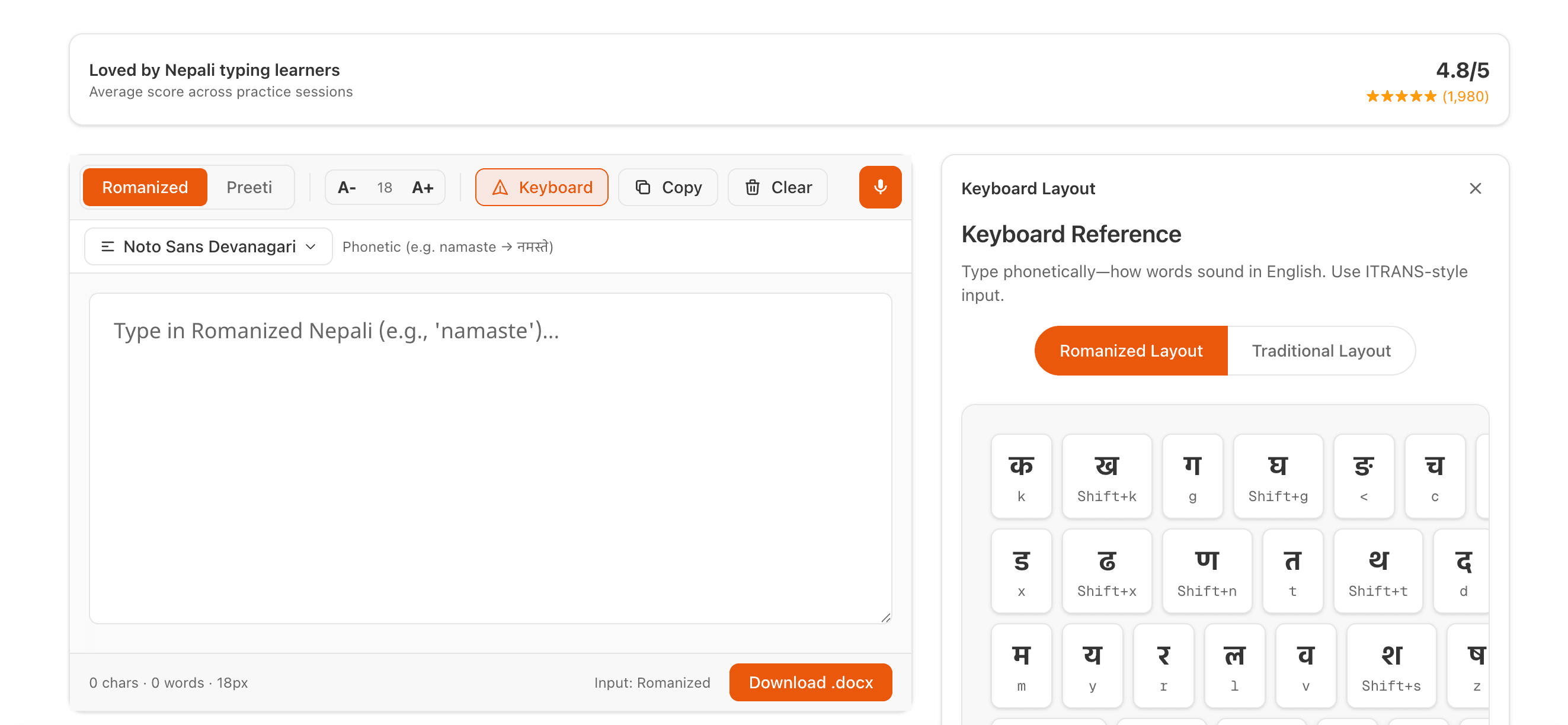
Step 1: Start with an Easy Nepali Typing Tool
For most users, the fastest start is Romanized Nepali typing. Open:
Type words as you pronounce them in English. Example:
mero naam->मेरो नामtapai lai kasto cha->तपाई लाई कस्तो छ
This is the easiest entry point for nepali words typing because you can use your existing keyboard habits.
Screenshot suggestion (SS-1):

Step 2: Choose Romanized or Preeti Based on Your Need
In 2026, most new content should be typed in Unicode. But some offices and legacy workflows still ask for Preeti.
Use these rules:
- Use Unicode for websites, modern apps, social media, email, and cross-device sharing.
- Use Preeti only when a specific legacy format is required.
Relevant tools:
If your content starts in Unicode (recommended), convert only when necessary.
Screenshot suggestion (SS-2):

Step 3: Use the Document Editor for Long Writing
If you are writing essays, notices, reports, applications, or official content, use:
Why this helps:
- Type Nepali words in one focused editor.
- Switch typing mode as needed.
- Choose fonts and preview text.
- Export/share content for practical use.
Instead of jumping between multiple apps, keep drafting and editing in one place.
Screenshot suggestion (SS-3):

Step 4: Practice Daily with Structured Lessons
If you want speed and accuracy, practice is mandatory. Use:
A practical 15-minute routine:
- 5 minutes: guided lesson in Typing Practice
- 5 minutes: speed test in Typing Test
- 5 minutes: correction-focused round (slow and accurate)
This routine builds muscle memory and reduces repeated spelling errors.
Screenshot suggestion (SS-4):

Common Problems in Nepali Words Typing (and Quick Fixes)
1) “My Nepali text looks broken on another device”
Cause: legacy font mismatch or unsupported font installation.
Fix: write in Unicode, then verify with a Unicode-friendly font from:
2) “I type English letters first, Nepali comes late”
Cause: this is normal in some input methods until conversion triggers.
Fix: use tools with live conversion and suggestion support:
3) “Office asked for Preeti format”
Fix your workflow:
- Write in Unicode first for clarity.
- Convert final text using:
4) “I can type but I am too slow”
Fix:
- Follow daily timed practice.
- Focus on accuracy first, then speed.
- Use:
5) “I need quick typing for drafts and notes”
Use voice support:
Then clean up grammar/spelling manually for final output.
Screenshot suggestion (SS-5):

Nepali Words Typing Tips That Actually Improve Speed
Many users stay stuck because they only type casually and never optimize technique. These tips can help you level up faster in 2026.
Tip 1: Keep Your Eyes on Text, Not Keyboard
This sounds simple, but it is powerful. If you constantly look down at keys, speed growth is limited. Use on-screen keyboard hints only as training support, then gradually reduce dependence.
Tip 2: Practice High-Frequency Nepali Words
Create a list of commonly used words and practice them repeatedly:
- आज, भोलि, कृपया, धन्यवाद, कार्यालय, जानकारी, आवेदन, परीक्षा, नेपाल, समुदाय
Frequent words improve fluency much faster than random paragraphs.
Tip 3: Use Word Chunks, Not Letter-by-Letter Thinking
For Romanized input, think in phonetic chunks:
su-swagatam(sound chunks) instead of isolated letters.
This improves rhythm and lowers hesitation.
Tip 4: Set Weekly Benchmarks
Track:
- Accuracy (%)
- WPM (words per minute)
- Error pattern (which letters/words fail most)
Benchmark targets for beginners:
- Week 1: 90% accuracy
- Week 2: 92-94% accuracy
- Week 3+: improve speed while maintaining 94%+
Tip 5: Build Real-Use Practice
Do not only practice random text. Type content you actually use:
- application letters
- social posts
- meeting notes
- short official notices
This makes your nepali words typing skill useful in real life, not only in tests.
Which TypeNepal Tools Should You Use for Each Task?
Here is a quick map:
- Daily Nepali typing: Easy Typing
- Long document writing: Documents
- Convert Unicode to legacy: Unicode to Preeti
- Convert legacy to modern: Preeti to Unicode
- Speed and accuracy testing: Typing Test
- Guided skill building: Typing Practice
- Data-entry style training: Data Entry Test
- Speech input for quick draft: Voice Typing
- All utilities: All Tools
You can combine these tools into one complete workflow:
- Draft in Easy Typing
- Edit in Documents
- Convert format if needed
- Test and improve speed
SEO and Content Writing Benefit of Proper Nepali Typing
If you create online content, better typing quality gives you practical advantages:
- cleaner spelling improves reader trust
- fewer typos reduce editing time
- Unicode text is searchable and index-friendly
- consistent script helps social sharing and discoverability
For bloggers, educators, and small businesses, accurate nepali words typing is not just language skill; it is also a productivity and visibility advantage.
7-Day Starter Plan for Nepali Words Typing
If you are new, follow this simple plan:
Day 1-2
- Start with Easy Typing
- Learn 30-40 frequent words
- Aim for comfort, not speed
Day 3-4
- Write one short paragraph daily in Documents
- Convert sample text with Unicode to Preeti and back with Preeti to Unicode
Day 5
- Take baseline in Typing Test
- Record accuracy and WPM
Day 6
- Do lesson rounds in Typing Practice
- Focus on your weak words
Day 7
- Use Data Entry Test
- Re-test in Typing Test and compare with Day 5
This 7-day plan creates momentum and gives visible improvement quickly.
Final Thoughts
In 2026, learning nepali words typing online is easier than ever. You can start with Romanized input, switch to Unicode-first writing, convert when needed, and improve speed with guided practice. The key is not choosing one perfect tool. The key is building a practical workflow and using the right tool for each task.
If you want a clean starting point today:
- Open Easy Nepali Typing
- Write your first 100 Nepali words
- Move to Documents for longer writing
- Track your progress in Typing Test
Small daily effort beats occasional long sessions. With consistency, your nepali words typing can become fast, accurate, and professional in just a few weeks.
Quick FAQ
Is Romanized typing good enough for beginners?
Yes. It is the fastest beginner path for nepali words typing, especially if you already type English comfortably.
Should I learn Preeti in 2026?
Only if your school, office, or workflow specifically requires it. For most modern use cases, Unicode is better.
Can I type Nepali on mobile too?
Yes. Most modern online tools are mobile-friendly and support live Nepali typing workflows.
Which tool should I open first?
Start here: https://typenepal.com/tools/easy-typing
Tags

Roshan KC
Software Engineer & Tech Journalist
Software Engineer with 6+ years of experience building scalable, AI-powered, and cloud-native solutions. Worked with 20+ clients across SaaS, E-commerce, restaurants, tours, and local businesses. Specializing in AI & automation, cloud-native architectures, SaaS platforms, and full-stack development. He is also an investigative tech journalist who writes about the latest happenings in the tech world.

%2Fimages%2Fanime-rails-codes-cover.png&w=3840&q=75)