
Arduino Tutorial Part 1: Arduino Basics

Welcome to the first part of our Arduino tutorial , Arduino Basics. First of all, lets take a little time to know what Arduino is. Arduino is an open source electroinc platform for making cool electronics project. It is an easy to use, cheap, open source, easily available platform. It's core is ATmega-328P chip(datasheet). It supports a wide range of peripherials and programming is also easy.
Basically any Arduino project requires two basic things i.e the hardware connection and the code to run. You can easily buy Arduino at Amazon and get the IDE to write the code from Arduino's official website. You can download Arduino for Windows, Linux as well as Mac. Basically, the working of projects based on Arduino can be simplified into following steps.
Make Premium Accounts Using BIN
Arduino Basics: Simplified steps for any Arduino Project
- Connect your hardwares.
- Write the code in Arduino IDE. You can also use any other IDE to write but to upload your code to your Arduino board you will need Arduino IDE.
- Upload your code. To upload your code, you will need to connect your Arduino board with your PC using the USB cable that you get while buying Arduino. Before uploading you will need to configure the Arduino board in your IDE. Just go to Tools>Port and select the port which is not empty. Before selecting port, make sure your board is connected to your computer.
- Run the project.
So, what is an Arduino board?
When we use the term Arduino, we generally mean Arduino board. It is the heart and brain of any Arduino Project. You connect all your peripherials to Arduino board and also upload your code to the board. There are various Arduino boards variations. To know about all of the boards click here. We will discuss 3 major boards here and they are:
- Arduino UNO : This is standard Arduino board and is mostly used one also.

- Arduino Mega : It is a bigger board with many pins. It is used for comparatively bigger projects.

- Arduino Nano : It is smaller and simple version of Arduino used to make simple projects.

Arduino Basics: Pin Configuration
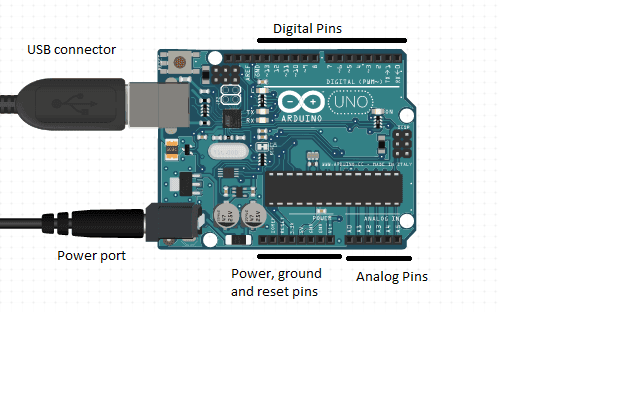
To make any project with Arduino, we must know its pin configuration. Pins are the places where we can connect our peripherials, power supply and the components of the project. We will look at the pin configuration of Arduino UNO. Pin configuration of other variations are fairly similar. The pin configuration of Arduino can be explained as below.

- Digital Pins : There are 14 digital pins in Arduino Uno. The pins numbered 0 to 13 are digital pins. They can be used to read or write digital data. Pin 0 (RX) is used to receive data to Arduino and Pin 1 (TX) is used to transmit data from Arduino in case of data transmitting/receiving devices like bluetooth module.
- Analog Pins :There are 6 analog pins A0 - A5. They are used to send/receive continuous data. They are used to operate devices such as potentiometer.
- 3, 5V and 5 V : These pins are used to provide 3.5 V and 5 V respectively to devices connected to Arduino. They can be used to operate devices like motors.
- Vin/GND : Vin is used to provide power to Arduino. The GND pins are used to close the electrical circuit and provide a common logic reference level throughout your circuit.
- USB port and Power port : Power port can provide power to Arduino through batteries and USB port is used to connect to computer for various purposes. USB port also can provide power during testing.
So these are the most basic things you need to get started with Arduino. Hope you liked it. We will discuss more things in our second part Arduino And Leds. We will also discuss many stuffs in upcoming parts. If you have any queries related to topic, leave a comment. To follow future parts of this tutorial, follow our Facebook page. See you on next part.

Roshan KC
Software Engineer & Tech Journalist
Software Engineer with 6+ years of experience building scalable, AI-powered, and cloud-native solutions. Worked with 20+ clients across SaaS, E-commerce, restaurants, tours, and local businesses. Specializing in AI & automation, cloud-native architectures, SaaS platforms, and full-stack development. He is also an investigative tech journalist who writes about the latest happenings in the tech world.