
How to get google cloud free | Free credits(100% working)

Google cloud free 100% working
with edu email-2023
Most of us want to use cloud service for free so, today we will learn how to get Google Cloud-free. Google Cloud runs under the same platform as Google and provides you with a cloud computing service. Google Cloud is one of the most wanted services among people who are familiar with cloud computing and who want to learn about cloud computing. Google Cloud Platform offers you enough resources to empower your application and project and reach your customers.
Is google cloud-free? Google Cloud provides you with a 12-month free tier with $300 free credits to use on your project but for that, you need to get through a lot of verification processes, and getting approved is quite a hard thing.
So, how to get Google Cloud-free? Today we will end your suffering of searching for a free Google Cloud method over the internet with our working simple method. We will get Google Cloud for free with a student subscription. In this way, you can get access to various cloud resources for building and launching your projects for free. You even get free credit to use Google Cloud resources. Let's learn the overall concept of Google Cloud.
note: we only provide tutorial for educational purpose and we are not responsible for what you do.
What is Google Cloud?
Google Cloud is the complete suite of cloud computing services that runs the same infrastructures as Google. It became officially available for public use in 2011. Google Cloud console provides you with a web-based graphical interface to manage and run your projects. As Google Cloud runs under the same infrastructure as Google products like Gmail, youtube, we get a qualitative platform same as that is required for running them.
Along with its web-based project management tools, Google also provides you with cloud computing, cloud storage, data analytics, and machine learning services. I think till now you know that to get such a qualitative service we must pay but is there any way to get such a cloud service for free? Yes. there is one way by which you can get Google Cloud-free. The method is quite simple and easy to use. We will use student offers provided by Google Cloud to get free Google Cloud without spending money.
Subscription to Google Cloud
Google Cloud pricing varies according to the service you choose. It can range from hundreds to thousands of bucks. With your credit card and a little bit of a verification process, you can get 12 months of free Google Cloud services which include $300 credits for your use inside Google Cloud.
But there is another interesting subscription which is Google Cloud for education. It provides teachers and students with free Google Cloud service. You get $50 free Google Cloud credits without any credit card, $200 credit in Qwiklabs for free, an additional 13 courses about cloud learning on Coursera, discounts, and additional benefits for free. So, why waste such an opportunity? That's why today we are going to use Google Cloud for education and get free Google Cloud computing service.
If you want to get unlimited google drive storage for free then click here.
Google Cloud services and advantages
let's discuss some of the services and advantages of Google Cloud in detail. Google lists over 90 products under Google Cloud brands. Let's discuss some of the major categories.
Cloud compute
Google Cloud offers various types of cloud computing services. It offers App engine services that help to deploy Java, node.js, PHP, c#, python, and ruby apps. It offers a computing engine and cloud execution platforms. It also offers cloud functions to run event-driven codes.
Google Cloud API platform
This is another service category that falls under Google Cloud services. It offers various types of API services including API monetization, API for maps platform, API analytics, developer portal to manage API, and other service infrastructures.
Google Cloud storage and database
Google Cloud provides you high-quality cloud storage facility with cloud database management. You get cloud SQL, persistent disks for your cloud computing, cloud data storage, etc. This minimizes the risk of data loss and security problems including data leaks, etc.
Networking services
You get every aspect of cloud networking with Google Cloud. It includes a virtual private cloud to manage cloud resources as per software. You get cloud DNS and cloud armor which protects your server from various types of attacks, cloud interconnects to connect your project with Google Cloud platforms. You can choose a networking plan as per your needs.
Google Cloud AI
One of the most important features and services of Google Cloud is cloud AI. It offers you most of the things that require machine learning and deploying and training custom machines and models. Cloud text-to-speech and speech-to-text, cloud translation, cloud natural language, etc. make your machine learning more effective.
Method to get Google Cloud free
We will divide our method to get Google Cloud free into two parts. In the first part, we will learn how to get working student emails for free. In the second part, we will get our Google Cloud for free.
Part 1: Get a working edu email for Google Cloud
- I am quite sure that our old users have one student email with them. You can also use your own edu email if you want.
- In our past tutorials, we had talked about how to get edu email for free.
- Let's discuss another Edu method. You need to apply to Fort Scott College for Edu email. If you have gone through our previous tutorials on student email then you know how to apply. Click here to apply.
- Now just enter your details or generated details.
- You will receive an email with your login details.
- You can't immediately use your student email. You can't log in to Google immediately with your edu email. So, we need to wait some time. Now, wait about a week to get your edu email activated.
Part 2: Getting Google Cloud with edu email.
- Visit this link of Google Cloud at first. Then click on the Join Now option. I will use the Fort Scott University Edu email to get Google Cloud for free. You can use your own edu email.

- Now enter your Gmail account on which you want Google Cloud free. You can also directly log in with your Edu email if your organization provides direct access.

- Enter your name, role as a student, and location, and select the university of email. You can use your own edu email or any edu email you received with our methods.

- Enter your date of birth and register on Google Cloud for free.

- Now for verification of your student status, just go to your old email and take a screenshot of your acceptance letter which you had got from Fort Scott or other universities.

- Just cover the password and send the screenshot for verification purposes.

- Now, wait about 2-3 days for getting verified from Google Cloud.

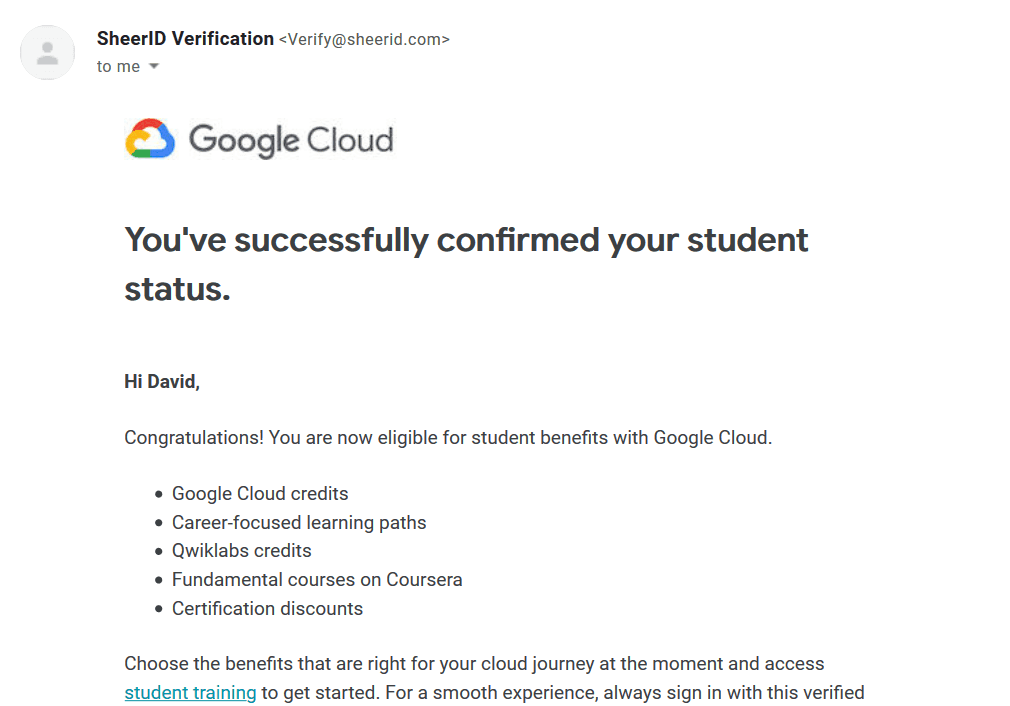
- Congratulations after 2-3 days you will receive emails like this. Enjoy your Google Cloud free.

Unlimited 1-month Qwiklabs credits for free
-
You can get $200 free credits on Qwiklabs with your Google Cloud student. Go to your Google Cloud student account with this link and get the offers.

-
There is another way by which you can get unlimited 1-month Qwiklabs credit for free even without edu email or Google Cloud. Visit this link first and register with your Google account. Click on the join option.
[caption id="attachment_3636" align="aligncenter" width="713"]
 Google cloud free[/caption]
 -
Now either directly sign up with your Gmail account or just enter your email account and sign up.
[caption id="attachment_3637" align="aligncenter" width="710"]
 Google cloud free[/caption]
 -
The click you agree with their policies.
[caption id="attachment_3638" align="aligncenter" width="713"]
 Google cloud free[/caption]
 -
After that visit this link and copy the code on a page like "1m-freelabs-433". This code will be used to get free credit.

-
Now go to this link and enter the code which you just copied in the above step.

-
Just click on the sign-in option again enter your previous email and log in with which you registered on Qwiklabs.
[caption id="attachment_3636" align="aligncenter" width="713"]
Google cloud free[/caption]
- After that go to the " A tour of qwiklabs and Google Cloud platform" option.

- Click on the start lab option and wait for about 30 seconds. After that end the lab.

- Now go back to qwiklabs.com and refresh your page.
- Now you can see you have unlimited credit for 1 month. Enjoy your free credits.

Making RDP with qwiklabs credits unlimited times for free
-
You can use this link and set up a 3-hour 20-minute qwiklab and make 3 3-hour 20-minute RDPs for free. You can create RDP for unlimited times for 1 month.
[caption id="attachment_3650" align="aligncenter" width="713"]
 Google cloud free[/caption]
 -
Just start a lab and click on use subscription.

-
Now some login details will be given to you. Click on the open Google Console option which is at the top left. Sign in with the credentials given to you.

-
Set up your locations and other details and agree with the policies.

-
Then click on compute engine option. This is where you will create your rdp.

-
Click on the Create option. Choose the server, OS, and other things as per your choice and finish.

-
Now just to the RDP option and get your login information for your RDP. I think you will know how to do that easily so, I am leaving the discussion for that.
That's it for today's tutorial on how to get Google Cloud free. I hope you enjoy our explanation. More such informative and useful tricks and content are coming in the future. Stay updated, share, and support us.
Tags

Roshan KC
Software Engineer & Tech Journalist
Software Engineer with 6+ years of experience building scalable, AI-powered, and cloud-native solutions. Worked with 20+ clients across SaaS, E-commerce, restaurants, tours, and local businesses. Specializing in AI & automation, cloud-native architectures, SaaS platforms, and full-stack development. He is also an investigative tech journalist who writes about the latest happenings in the tech world.