
How to create invisible folder in PC | Blank names , Fb comments

How to make invisible folder in windows is what we are going to learn today in simple steps. Don't worry i am not going to make your folder go invisible in your beloved PC's by doing some kind of wizardry. Well i am not Harry Potter so i guess with some of my simple knowlege of 'windowsdry' instead of wizardry i am going to make it happen.
With this method you can create invisible names in many of the media's, do invisible comments, invisible posts and much more such invisible tasks and no kind of wizardry from harry potter is involved here. We don't need any extra software. You can just perform the task of how to make invisible folder just by using your PC with windows.
If you haven't read our previous article on getting free RDP then click here
Requirements
- PC with windows
- Steps of Toptechpal
How to make invisible folder?
#invisible folder
- First of all turn on your PC and navigate to search option.
- Search "Character Map" and click on it.

- Now search for the Blank option from the given list of words by scrolling down.

- There you will see many blank box. Click on any of the blank box and click on 'select' option .
- Now click on 'copy' option.
- It's time to create a folder now if you are making new folder invisible. Otherwise you can make your old folder go invisible. Right click and navigate to 'new' and make folder new folder.

- While naming the folder simply paste the blank word you had just copied. Now your folder will have blank name.

- Now right click on folder and go to properties option.

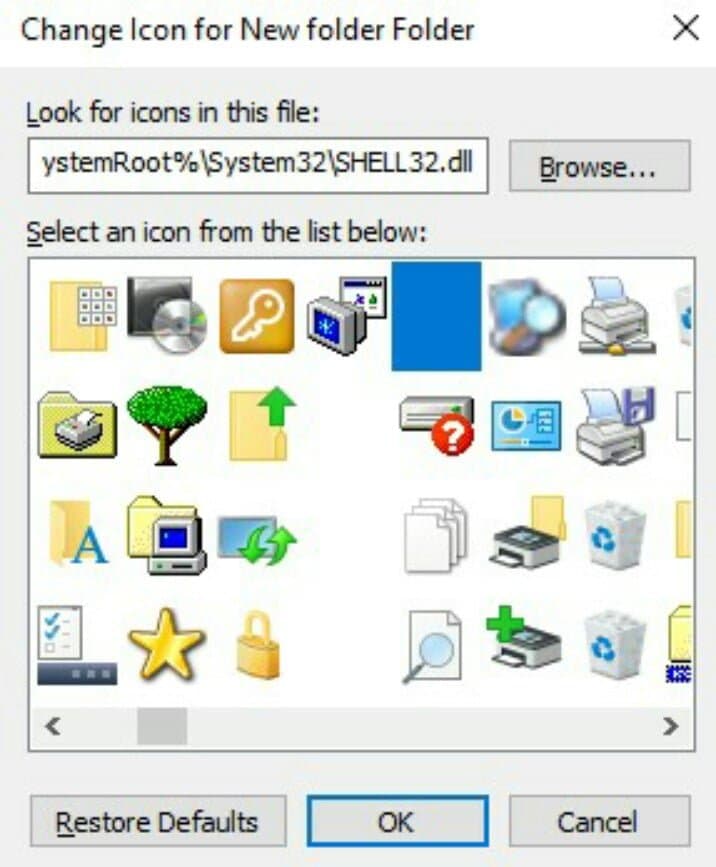
- From there navigate to customize and click on change icon.
- Scroll and choose blank icon and click ok and change icon.

- Boom your folder is invisible even to yourself.

Tips: From personal experience we don't suggest hiding many things in such folder because you might even not find the folder sometimes while you need it as it is invisible.
Making invisible things in social media's make you even look cool. So i have one method to leave those fake methods in past behind and go with toptechpal's method to make invisible stuffs like name, posts and comments.
How to do invisible comments, posts?
- See how to make invisible folder was too much easy. As i explained before just copy the blank word by going to character map option in your PC.
- Simply paste it as much as you like because nobody is seeing what it is anyway.
- Now just comment or post and boom here you make invisible comments or post in social media like facebook which makes you look cool.

If you want to create free edu email then click here
How to create invisible names?( Blank names)
- As i have explained before simply copy the invisible word or blank word from character map.
- Paste the word in first name and last name.
- Now you have cool invisible name.
- This actually may not work while naming in many sectors so try where it will work and find out.
If you want to learn about anything then feel free to suggest us topics by contacting us or commenting below. We would be happy to provide knowledge you want to have. Suggest anything you like or want it know. We will be waiting for your feedback
If you want to learn such kind of tricks then feel free to subscribe to our blog through newsletter and turn on notification icon. Don't forget to like our facebook page. If you enjoyed this trick then feel free to share it with your friends and support us because we want your love and care too.
Tags

Roshan KC
Software Engineer & Tech Journalist
Software Engineer with 6+ years of experience building scalable, AI-powered, and cloud-native solutions. Worked with 20+ clients across SaaS, E-commerce, restaurants, tours, and local businesses. Specializing in AI & automation, cloud-native architectures, SaaS platforms, and full-stack development. He is also an investigative tech journalist who writes about the latest happenings in the tech world.